Ergonomic office chair designs are developed around the relationship between a person, a chair, a desk, and the tasks performed while seated.
Unlike basic seating, ergonomic designs focus on adjustability, posture, support, movement, and the ability to fit different body shapes and working habits.
The idea exists because people may spend many hours working at desks, particularly in computer-based roles. A chair that cannot be adjusted to the user can contribute to awkward posture, pressure on certain body areas, or unnecessary discomfort during extended periods of sitting.
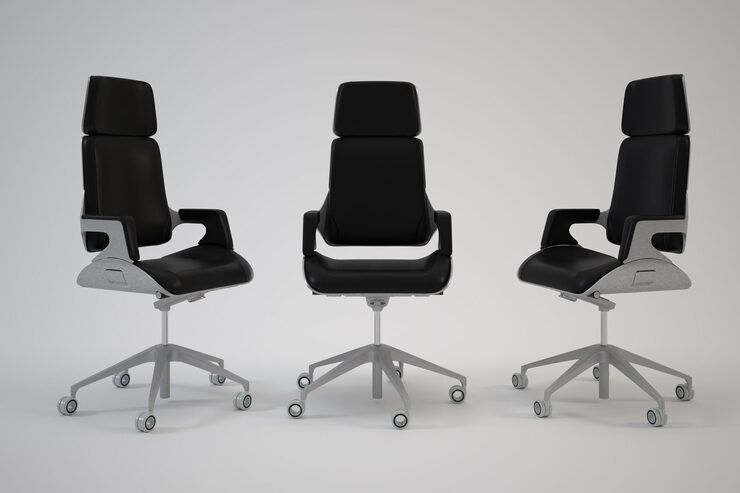
A modern ergonomic office chair commonly includes several adjustable or supportive elements:
- Seat-height adjustment to position the legs comfortably.
- Backrest support that follows the general shape of the back.
- Lumbar support that can be positioned according to individual needs.
- Adjustable armrests to help position the forearms.
- Seat depth that accommodates different leg lengths.
- A stable base and suitable casters for controlled movement.
- A reclining mechanism that permits changes in seated posture.
- Breathable or supportive materials suited to the working environment.
Ergonomic design is not based on one universal chair shape. A suitable design depends on the user's body dimensions, work activities, desk height, screen position, and how frequently the person changes posture.
Why Ergonomic Chair Design Matters
Office work increasingly involves prolonged computer use, digital communication, and tasks performed from fixed workstations. This makes the relationship between seating and workstation arrangement important for employees, employers, students, and people working from home.
An ergonomic chair can help users establish a more appropriate relationship between their body and the workstation. The chair alone, however, does not determine whether a workstation is ergonomic. Desk height, monitor position, keyboard placement, lighting, and movement habits also influence the overall setup.
The main problems ergonomic design attempts to address include:
- Poor seating posture.
- Excessive pressure behind the knees.
- Unsupported lower-back positioning.
- Elevated or unsupported shoulders.
- Excessive reaching toward a keyboard or mouse.
- Limited ability to change posture.
- Poor alignment between the chair, desk, and display.
A useful ergonomic setup normally allows the user to sit with the feet supported, shoulders relatively relaxed, and frequently used equipment within a practical reach. The exact arrangement should be adapted to the individual rather than treated as a fixed formula.
Key Design Features
| Design feature | Main purpose | What to check |
|---|---|---|
| Seat height | Aligns the body with the desk | Feet should remain supported |
| Seat depth | Accommodates different leg lengths | Avoid excessive pressure behind knees |
| Lumbar support | Supports the lower-back region | Should be adjustable where practical |
| Backrest recline | Allows posture changes | Movement should remain controlled |
| Armrests | Supports forearms and reduces shoulder elevation | Height should match working position |
| Chair base | Provides stability | Check balance and movement |
| Casters | Allow controlled movement | Suit the floor surface |
| Seat and back materials | Affect pressure distribution and comfort | Consider ventilation and durability |
One important principle is adjustability. A chair designed for a wide range of users generally provides more flexibility than a fixed chair. However, additional adjustment mechanisms do not automatically make a chair ergonomic. The controls must be understandable and usable, and the resulting positions should suit the user's workstation.
Recent Developments in Ergonomic Chair Design
Ergonomic seating has increasingly moved toward adaptable work environments rather than fixed workstation arrangements. Shared desks, hybrid working patterns, and different working postures have increased interest in chairs and workstations that can be adjusted for different users.
A notable Indian standards development occurred in March 2025, when the Bureau of Indian Standards published a draft revision of IS 16595 Part 5, covering workstation layout and postural requirements. The draft was intended to align the Indian standard with ISO 9241-5:2024. It added greater attention to workspace adaptability, shared workstations, active postural changes, semi-standing postures, and improved adjustability.
The development is relevant to ergonomic chair design because seating is part of the wider workstation rather than an isolated product. Updated anthropometric information and greater attention to user adaptability can influence how chairs, desks, displays, and other workstation elements are designed together.
India also continues to use IS 17631:2022 – Work Chairs – Specification for work-chair requirements. The standard covers design, dimensions, stability, strength, durability, and related performance considerations. BIS information also identifies testing areas such as seat and back durability, armrest durability, swivel performance, and overturning tests.
BIS testing information shows continued activity around IS 17631 during 2025 and 2026, indicating that work-chair conformity and laboratory testing remain active areas within the Indian standards system.
Indian Laws, Standards and Workplace Policies
In India, ergonomic office seating is influenced by workplace health and safety requirements as well as product standards.
The Occupational Safety, Health and Working Conditions Code, 2020 became enforceable on 21 November 2025. The Code establishes a broader framework for occupational safety, health, and working conditions.
Section 23 states that employers are responsible for maintaining prescribed health, safety, and working conditions. The provisions include matters such as ventilation, temperature, workplace space, lighting, hygiene, and other workplace arrangements.
The Code does not mean that every office must use one particular ergonomic chair design. Instead, workplace seating should be considered within the broader requirements for suitable working conditions and applicable rules.
For product specifications, IS 17631:2022 is particularly relevant to work chairs. BIS describes the standard as covering completely manufactured and ready-to-assemble work chairs used in office environments, with requirements addressing ergonomic characteristics, strength, stability, durability, materials, design, and workmanship.
BIS also provides its Know Your Standard platform, where users can search Indian Standards by standard number or keyword and access available standard-related information.
Practical Tools and Resources
Several resources can help people understand and assess ergonomic office chair designs:
- BIS Know Your Standard: Useful for checking Indian Standards by number or product keyword.
- IS 17631:2022: A key Indian reference for work-chair specifications and performance.
- IS 16595 Part 5: Relevant to workstation layout and postural requirements, including the 2025 draft revision.
- Workstation assessment checklists: Useful for reviewing chair height, monitor position, keyboard placement, and foot support.
- Chair adjustment guides: Helpful for recording preferred seat height, seat depth, backrest position, and armrest position.
- Anthropometric measurement charts: Useful when workstation furniture must accommodate users with different body dimensions.
- BIS laboratory information: Can help identify testing facilities associated with applicable Indian Standards.
A simple workstation review can be recorded in a table:
| Check | Suitable indication |
|---|---|
| Feet | Supported and stable |
| Knees | Comfortable angle without excessive pressure |
| Back | Supported by the backrest |
| Shoulders | Relaxed rather than raised |
| Arms | Supported without excessive elevation |
| Screen | Positioned to avoid prolonged awkward neck posture |
| Keyboard and mouse | Within comfortable reach |
| Movement | User can change posture regularly |
Frequently Asked Questions
What makes an office chair ergonomic?
An ergonomic office chair generally provides adjustability and support for the user's body and working position. Important characteristics can include adjustable seat height, suitable seat depth, lumbar support, backrest movement, armrest adjustment, and a stable base.
Is lumbar support necessary for every office chair?
Lower-back support can be useful, particularly during extended desk work, but the appropriate amount and position vary between users. A chair should allow the user to establish a comfortable supported posture rather than forcing one fixed position.
Does an ergonomic chair eliminate posture-related problems?
No. A chair is only one part of an ergonomic workstation. Desk height, monitor placement, keyboard position, lighting, movement, and individual working habits also affect the overall setup.
What is IS 17631:2022?
IS 17631:2022 is an Indian Standard titled Work Chairs – Specification. It establishes requirements related to work-chair design, dimensions, stability, strength, durability, and other performance characteristics.
Have Indian ergonomic workstation standards changed recently?
A significant recent development was the March 2025 BIS draft revision of IS 16595 Part 5. It proposed updated provisions concerning adaptable workstations, shared workstations, active postural changes, semi-standing positions, and improved adjustability.
Conclusion
Ergonomic office chair designs are part of a wider approach to creating workstations that accommodate different users and working positions. The most useful designs generally focus on adjustability, stability, body support, movement, and compatibility with the surrounding workstation.
In India, work-chair design is supported by standards such as IS 17631:2022, while broader workplace conditions are addressed through occupational safety legislation. Recent BIS developments in 2025 also show greater attention to adaptable workstations and changing postures.
For individuals and organizations, the practical approach is to evaluate the complete workstation rather than focusing on the chair alone. A well-adjusted chair, suitable desk arrangement, appropriate screen placement, and regular changes in posture can work together to create a more suitable working environment.